
Themes
One [theme] table in limanix.toml colors the whole VM: lmx, the prompt, tmux, the editor and the other tools of the catalog draw with the same palette.
[theme]
name = "tokyo-night"
Apply a change with limanix update --config limanix.toml; the VM restarts with the new colors.
Choose a theme
- background
#1e1e2e - background_dark
#181825 - background_darker
#11111b - surface
#313244 - selection
#45475a - border
#585b70 - muted
#9399b2 - subtle
#a6adc8 - foreground
#cdd6f4 - accent
#cba6f7 - red
#f38ba8 - orange
#fab387 - yellow
#f9e2af - green
#a6e3a1 - cyan
#94e2d5 - blue
#89b4fa - purple
#cba6f7 - pink
#f5c2e7
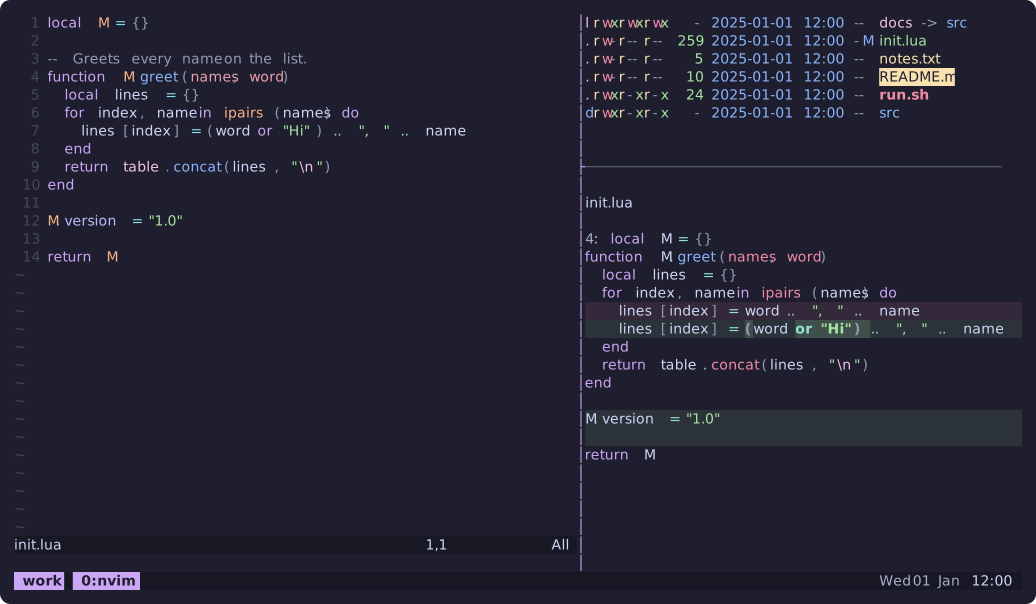
Each preview shows the VM's own tmux, Neovim, eza -l and git diff through delta, drawn in a terminal with the theme. system, the default, has no preview: it takes the colors of your terminal.
How the tools take the colors
A theme is a palette of 18 colors, each with a role. Every tool draws the same kind of part with the same role, which keeps the tools alike: a selection takes selection, an error takes red, the active pane and the current window take accent.
| Role | Draws |
|---|---|
background | Main background |
background_dark, background_darker | Panels and bars, such as a status line, and the deepest borders |
surface | Raised parts: the current line, a menu, a message |
selection | Selected text and items |
border | Borders, separators and inactive outlines |
muted, subtle | Comments and hints; secondary text and labels |
foreground | Main text |
accent | The theme's signature color: focus, the active item, highlights |
red, orange, yellow, green, cyan, blue, purple, pink | Hues; red marks errors, yellow warnings, green success |
The editor is the exception: AstroNvim and Neovim load the theme's own Neovim colorscheme, which its authors made from the same palette. Each module page names the settings that carry its colors; CLI tools lists them for the command-line tools.
The system theme
With system, the VM draws in the 16 colors of your terminal's theme on the Mac, on its background. When you change that theme, or the terminal switches between light and dark, the VM follows at once; there is nothing to apply. A few tools keep colors of their own:
| Tool | With system |
|---|---|
| AstroNvim | Catppuccin text colors on a transparent background: Latte on a light terminal background, Mocha on a dark one |
| Harlequin and Posting | The colors of catppuccin-mocha |
| Neovim | Neovim's own colorscheme |
Match your terminal
A theme paints the backgrounds of tmux, the editor and the full-screen tools, while the output of the shell itself sits on the terminal's background. Choose the same theme in your terminal on the Mac, or a terminal theme with a close background.
Your own settings
Settings you make in a tool itself take precedence: a personal configuration file, a variable in the [env] table or a line in a startup file replaces the theme's value. NO_COLOR or TERM=dumb turn the colors of lmx off.
A new theme is added in the catalog; the catalog contract describes how.