
Prompts
prompt in the [shell] table chooses the prompt of your shell in the VM. Every prompt of the catalog draws in the colors of your theme and, outside tmux, shows the status words of the VM.
[shell]
preset = "terminal"
prompt = "starship"
Apply a change with limanix update --config limanix.toml; the next limanix shell starts with the new prompt.
Choose a prompt
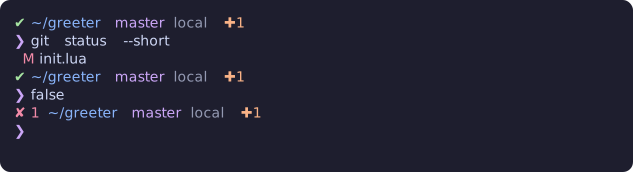
bash-git-prompt, a Bash prompt with the directory, Git state and the last command's status, in the colors of the guest's theme.
Each preview shows the prompt in a Git repository with a changed file, after a command that succeeds and after one that fails, in the catppuccin-mocha theme.
Where each prompt runs
A prompt must run in the shell of your preset: Zsh with terminal, Bash with minimal. limanix create and limanix update reject a prompt that does not and name the prompts that do.
prompt | Shells | Presets |
|---|---|---|
bash-git-prompt | Bash | minimal |
liquidprompt | Bash, Zsh | minimal, terminal |
oh-my-posh | Bash, Zsh | minimal, terminal |
powerlevel10k | Zsh | terminal |
pure | Zsh | terminal |
spaceship | Zsh | terminal |
starship | Bash, Zsh | minimal, terminal |
Without a prompt
pure is the default with terminal, and none with minimal. none leaves the prompt to your startup files: set PROMPT in ~/.zshrc or PS1 in ~/.bashrc. Until you do, Bash shows your account, the VM's hostname and the directory in the theme's colors.
Your own settings
Each prompt reads your own settings from its own place, such as ~/.config/starship.toml for Starship or ~/.p10k.zsh for Powerlevel10k. The catalog page of each prompt names that place under Configuration and integration, and the settings that carry its colors under Colors.
A new prompt is added in the catalog; the catalog contract describes how.